


Let's settle the first question fast: Microsoft Teams has no built-in birthday feature. None. Praise won't do it, there's no toggle hiding in settings, and the calendar won't announce anything. Which is why every team eventually ends up with the same broken system — a spreadsheet someone maintains, a manager who remembers until they don't, and that one person whose birthday passed in silence and who definitely noticed. The fix is a birthday bot. Here's every real option for Teams in 2026 — paid apps, Microsoft's free template, and the DIY Power Automate route — with pricing we verified on official pricing pages this month.
Quick answer: Tribe automates birthdays AND work anniversaries in Teams for $1/user/month ($0.75 annual) — and you get a free celebration post every month, no card required. It also solves the harder problem: collecting the dates, by asking teammates privately instead of making you chase a spreadsheet. AnnounceBot and Billy Birthday are solid single-purpose alternatives.
The real problem isn't posting — it's collecting the dates
Any bot can post "Happy birthday @Sam 🎉" on a schedule. The reason birthday automation fails in practice is upstream: nobody has the dates. HR won't export them (reasonably — that's sensitive data), the spreadsheet is three reorgs old, and new hires never get added. So before comparing features, ask one question of any tool: how does it get birthdays into the system? The good answers are self-serve (each person adds their own date, once) or bulk import. The bad answer is "the admin fills in a form for everyone" — that's the spreadsheet again, wearing a bot costume.
The best birthday bots for Microsoft Teams
| Option | Price | Anniversaries too? | How dates get collected |
|---|---|---|---|
| Tribe | 1 post free every month, then $1/user/mo ($0.75 annual) | ✅ | Self-serve: bot DMs teammates to add their own dates |
| AnnounceBot | $0.40/user/mo | ✅ | Bulk import + individual entry |
| Billy Birthday | Free under 10 users; $1/user/mo after | ✅ | Self-serve + HRIS on Enterprise (200+ seats) |
| CultureBot Basic | Not published (quote/JS-only pricing) | ✅ | Admin setup |
| HeyTaco Deluxe | $5/user/mo (recognition suite) | ✅ | Admin setup |
| Matter Basic | $1/user/mo (recognition suite, annual) | ✅ | Admin setup |
| Microsoft Celebrations template | Free (self-hosted) | ✅ | Users add events themselves |
| Power Automate DIY | Free-ish (your time) | If you build it | Entra profile data — usually empty |
1. Tribe — best all-round celebrations bot for Teams
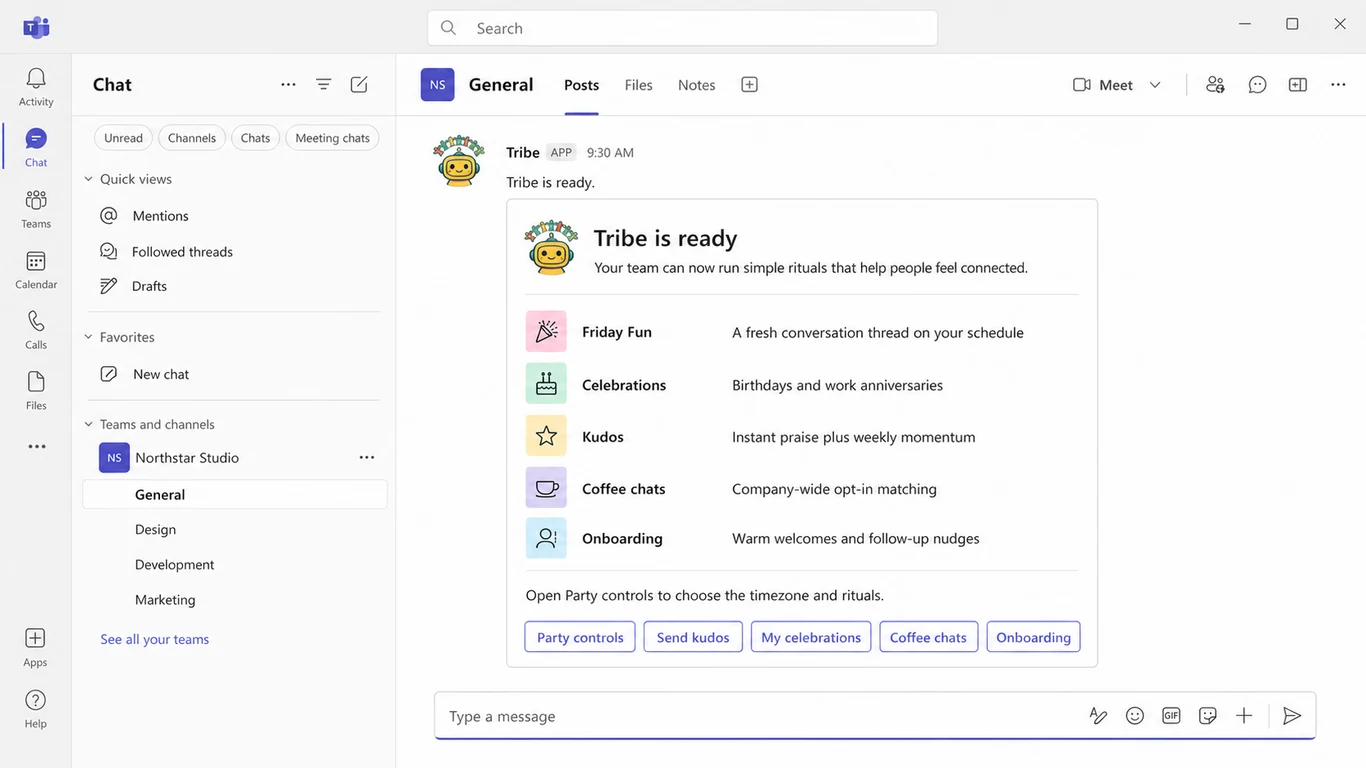
Tribe treats celebrations as one ritual in a culture stack, which turns out to be exactly what makes it work. The bot collects dates the sane way — it privately messages teammates who haven't added theirs, and each person fills in their own birthday (and hire date for work anniversaries) in under a minute. No spreadsheet, no HR export, no admin data entry. On the day, a celebration card posts to your channel at the time you chose, in your channel's timezone, so the Sydney office isn't getting birthday wishes at 11 PM.
- Birthdays and work anniversaries, posted automatically with a card the team piles onto
- Self-serve date collection via private prompts — the part every other approach gets wrong
- Timezone-aware posting per channel, with configurable day/time
- One free celebration post every month (no credit card); unlimited for $1/user/month or $0.75/user/month billed annually
- The same bot runs kudos, weekly icebreakers, coffee chat matching, and new-hire intros — each with its own free monthly allowance, so the birthday bot isn't a one-trick install
- Also native on Slack and Google Chat if your org runs more than one platform
2. AnnounceBot — cheapest dedicated birthday app
AnnounceBot is a Teams-first birthday and anniversary specialist at $0.40/user/month with a 30-day trial — the lowest per-seat price in the category. It does group greeting cards teammates can sign, welcome messages for new hires, and bulk date import. The catch: it's single-purpose. If a birthday bot is genuinely all you want, it's the budget pick; if you'll want kudos or icebreakers within the year, you'll be shopping again.
3. Billy Birthday — best free option for tiny teams
Billy Birthday (by BuddiesHR) started as a Slack favorite and now runs on Teams. It's genuinely free for teams under 10 people, then $1/user/month, with HRIS sync arriving only on its 200-seat Enterprise tier. Personality-forward, does the job well. The catch: birthdays only from the one bot — BuddiesHR sells kudos, coffee, and the rest as separate apps, so the "one thing per bot" philosophy multiplies installs and line items as your needs grow.
4. Recognition suites that include celebrations
If you're already shopping for a recognition tool, birthdays may come bundled: HeyTaco Deluxe ($5/user/month) and Matter Basic ($1/user/month, annual) both automate birthday and anniversary posts alongside kudos, and EngageWith ($3/user/month yearly) includes birthday reminders with its recognition-plus-surveys bundle. CultureBot's Basic tier is celebrations-focused, but its pricing isn't published in plain numbers — you'll need to get a quote. See our full Teams recognition comparison for how these stack up on the kudos side.
5. Microsoft's free Celebrations template — for teams with IT time
Microsoft publishes an open-source Celebrations app template for Teams: free, and teammates add their own events. The asterisk is the word "template" — your IT team deploys it to your own Azure subscription, owns the hosting bill, and maintains it forever, including when it breaks. For an IT-heavy org with zero software budget it's legitimate; for everyone else, do the math on engineer-hours versus $0.40–1/user/month.
6. The Power Automate DIY route
You can build a flow that reads birthdates from Entra profiles and posts to a channel. In practice this dies on the data: the birthdate field is empty for most orgs, populating it needs admin PowerShell or manual HR work, and there's no self-serve way for employees to add their own. You'll also maintain the flow through every connector change. Build it if you enjoy building it — not because it's easier.
Don't forget work anniversaries
Birthdays get the attention, but work anniversaries are the underrated celebration — they're about the company, which makes them the one milestone leadership actually should never miss. A three-year anniversary passing unnoticed says more than a missed birthday does. Tribe tracks hire dates alongside birthdays and posts anniversary cards automatically ("3 years of Aisha! 🎉"), and most of the suites above handle both. If you're evaluating a single-purpose birthday app, check whether anniversaries are included or an upsell.
Conclusion
For most Teams organizations, the right birthday bot is the one that collects dates with consent, handles work anniversaries too, and does not create another spreadsheet. Billy Birthday is the simplest free option for fewer than 10 people; Tribe is the broader choice when celebrations should live beside kudos, icebreakers, and introductions. Microsoft's template is viable when IT is willing to own deployment and maintenance.