


Search for an icebreaker bot for Microsoft Teams and you'll mostly find advice from 2019: install Microsoft's open-source "Icebreaker" app template. Which is real — and also a trap for most teams, because "app template" means your IT department deploys it to your own Azure subscription, pays the hosting, and maintains it forever. The category has moved on. In 2026 there are hosted bots that post icebreakers on a schedule, run watercooler prompts, and pair people for chats — installed from the Teams store in a minute, no Azure required. Here's the honest field guide.
Quick answer: Tribe is a complete culture bot for Microsoft Teams, not just an icebreaker tool. It runs weekly Friday Fun prompts in your channels and creates 1:1 coffee-chat matchups, while also bringing kudos, birthdays, celebrations, and new-hire introductions into one place. Prompts rotate automatically and never repeat, and two Friday Fun threads a month are free at any team size.
Two icebreaker formats — and why a culture bot should do both
Team icebreakers work in two complementary formats. A complete culture bot can run both, letting you use each one for the connection it creates best:
- Prompt-style icebreakers — a bot posts a question to the whole channel ("What's your most controversial food opinion?") and the team answers in a thread. Zero commitment, works async, includes everyone. This is what most teams actually want
- Pairing-style icebreakers — a bot matches two people for an optional 1:1 coffee chat. The commitment is higher, but so is the chance of building a deeper relationship. Microsoft's old Icebreaker template is pairing-only; Tribe supports these matchups alongside its channel prompts and wider culture toolkit
This article focuses on prompt quality because that is what people searching for an icebreaker bot usually want to see. But you do not have to choose between public prompts and private pairings: Tribe runs both, so a team can build channel-wide participation and deeper 1:1 connections with the same culture bot.
The best icebreaker bots for Teams, compared
| Option | Type | Price | The catch |
|---|---|---|---|
| Tribe | Culture bot: prompts, coffee chats, kudos, birthdays + more | Free forever, any size | Monthly feature caps on the free plan |
| DailyBot | Watercooler + icebreaker prompts | Free Starter tier; paid from $3/user/mo | Icebreakers are one module of a broad standup platform |
| Dewdropz Coffee Station | Watercooler prompts + pairing | $3/active user/mo, $49/mo min | Minimum stings under ~16 people |
| LEAD.bot | Watercooler topics + pairing | Watercooler from $49/mo; matching from $59/mo | Poor value for small teams |
| Polly | Polls, trivia, Q&A | Free tier; paid plans on their site | Engagement tool you drive manually |
| Water Cooler Trivia | Weekly trivia quizzes | Paid (see their site) | Trivia only — not conversation prompts |
| Geekbot | Standup tool with icebreaker template | Free under 10 users; $2.50/user/mo billed annually | Icebreakers are a side feature of a check-in bot |
| Microsoft Icebreaker template | Weekly 1:1 pairing | Free (self-hosted on Azure) | Your IT team owns deployment + maintenance |
1. Tribe — one complete culture bot for prompts and coffee chats
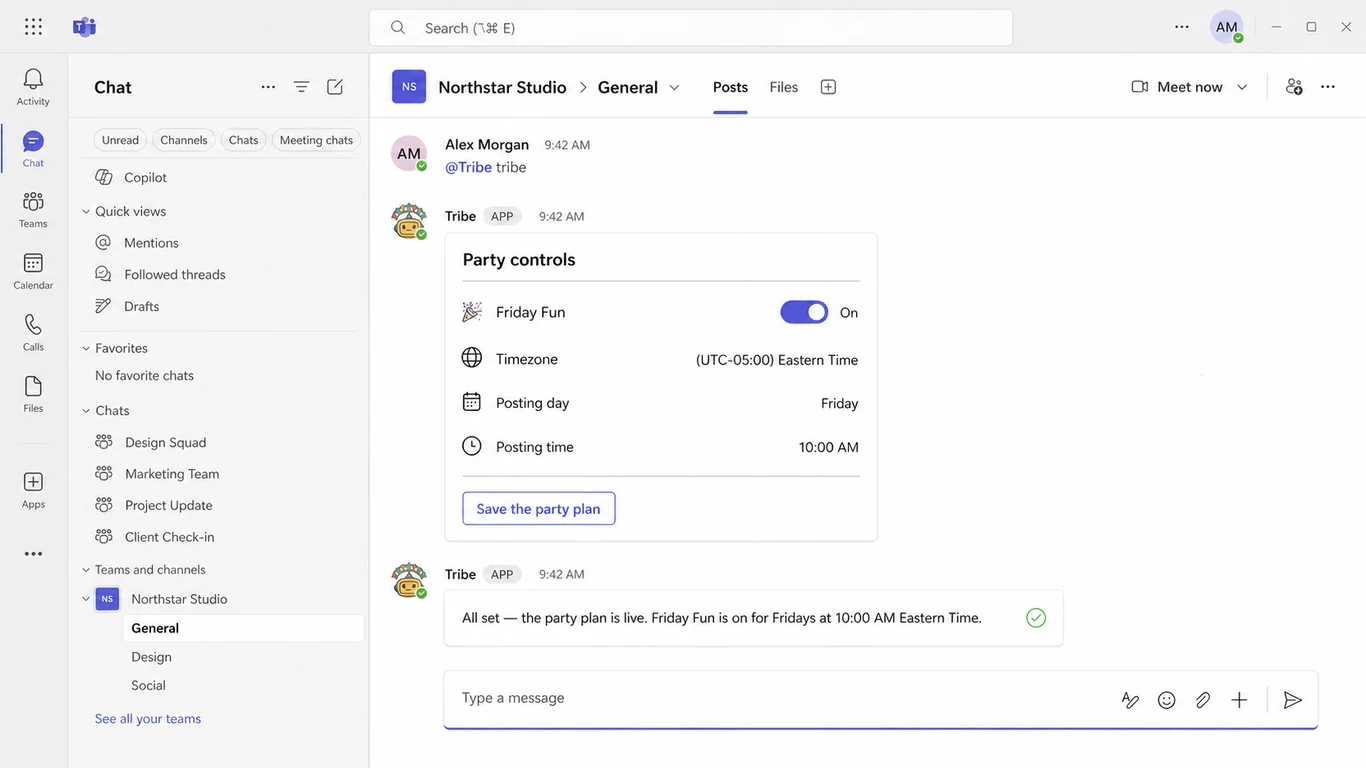
Tribe is built to be the culture layer inside Microsoft Teams, Slack, and Google Chat. Friday Fun is its channel-wide icebreaker ritual: you pick the day, time, and timezone, and Tribe posts one conversation thread a week. Prompts rotate through photo-based show-and-tell questions, low-stakes debates, throwback questions, and weekend plans — and Tribe tracks what it has posted where, so a channel never sees the same prompt twice until the whole library is exhausted. For deeper connections, Tribe also creates coffee-chat matchups and nudges each pair to meet, without asking you to install a separate pairing bot.
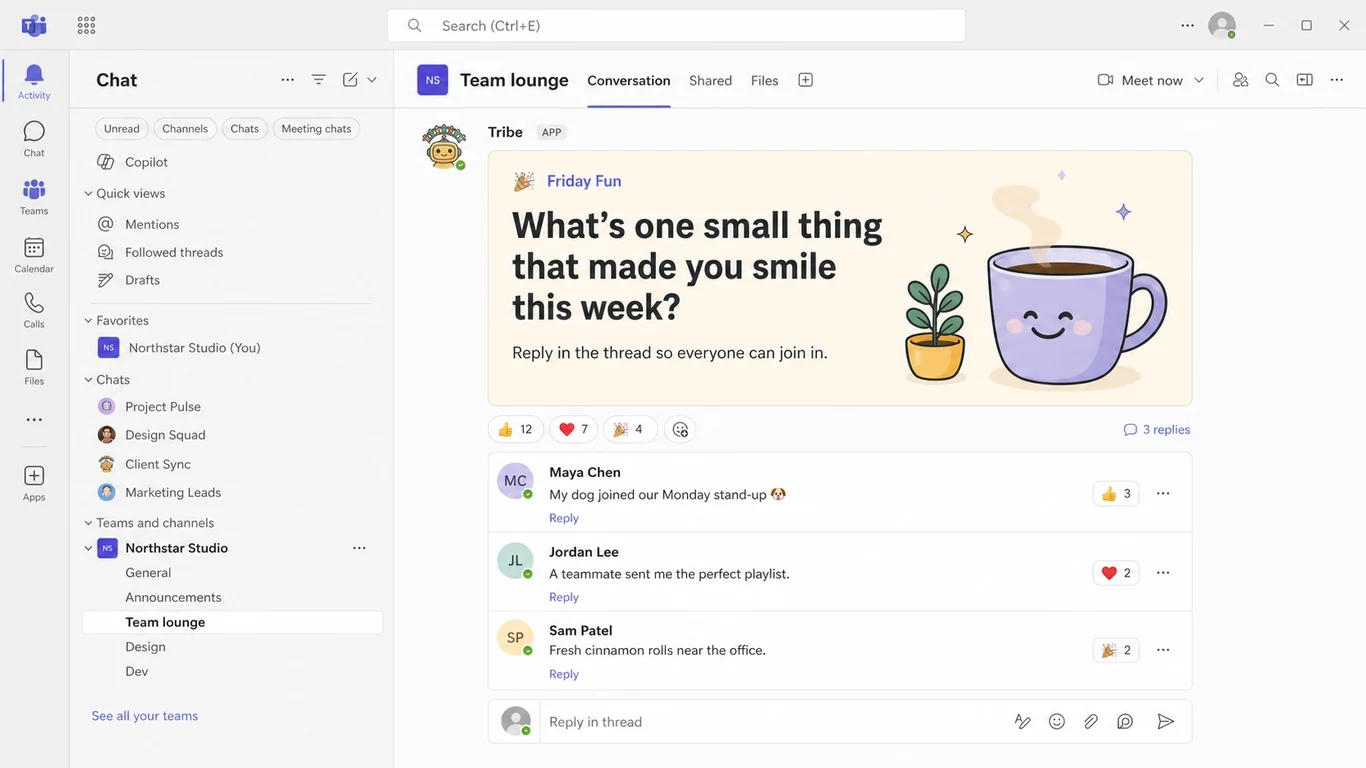
Why weekly and not daily? Because daily prompts die. The first week is fun, the third week is noise, and by week five the bot is furniture. One good thread a week keeps the ritual scarce enough that people show up for it. Two Friday Fun threads a month are free at any team size — and the same bot does kudos (3 free a month), birthdays, coffee chats, and new-hire intros when you're ready for more, on Slack and Google Chat as well as Teams. Upgrade and every cap comes off.
2. DailyBot — watercooler prompts inside a bigger platform
DailyBot is the closest direct competitor to a dedicated prompt bot on this list. Its Watercooler feature posts random icebreaker questions into a channel on a weekly cadence (you pick the weekdays), and it runs on Teams, Slack, Google Chat, and Discord. The trade-off is scope: watercooler is one module of a broad async-standup platform that also does check-ins, kudos, retrospectives, and custom workflows. There's a free Starter tier, with paid plans from $3/user/month. If you already want DailyBot for standups, turning on watercooler is a no-brainer; if all you want is a weekly icebreaker thread, it's a lot of product to adopt for one feature.
3. Dewdropz — watercooler prompts with pairing attached
Dewdropz is Teams-only and combines coffee pairings with a "Coffee Station" watercooler that drops conversation prompts into a channel. At $3 per active user per month with a $49 monthly minimum, it's priced for teams of roughly 16+ — below that you're paying the minimum regardless. Solid if you want pairing and prompts from one focused tool and don't need celebrations or recognition.
4. LEAD.bot — flat-rate bundles for bigger teams
LEAD.bot's $49/month Light plan includes watercooler topics, birthdays, and pulse surveys; teammate matching begins on its $59/month Standard plan. The flat rate is the whole decision: it can be attractive at a larger headcount and hard to justify for a small team.
5. Polly, Water Cooler Trivia, and Geekbot — adjacent, not quite icebreakers
Three tools that show up in every icebreaker search and deserve an honest classification: Polly is a polls/surveys/trivia engine — great for "vote on Friday's lunch" and quick quizzes, but someone has to write and send each poll; it's a tool you drive, not a ritual that runs itself. Water Cooler Trivia sends scheduled trivia quizzes with scoring — genuinely fun, but trivia competition and open conversation prompts are different rituals. Geekbot is an async-standup bot with an icebreaker template ("Pizza Toppings") that DMs people a random question from a ~200-question bank and posts their answers to a channel — weekly on Fridays by default, free under 10 users and $2.50/user/month after; a fair pick if you're already running standups in Geekbot, but icebreakers are a bolt-on rather than the point. None of the three replaces a weekly icebreaker thread; all three can complement one.
6. Microsoft's Icebreaker app template — free, if IT owns it
The open-source Icebreaker template pairs two random members of a team every week (Monday 10 AM by default) and nudges them to meet. It's free software — but not a free product: your organization deploys it to its own Azure subscription, pays the hosting, and owns every upgrade and breakage forever. It also hasn't meaningfully evolved in years, which is why so much icebreaker advice for Teams feels frozen in 2019. If your IT team enjoys running internal apps, it works; everyone else should weigh engineer-hours against a bot that costs $0–3/user.
12 real Tribe icebreaker prompts that get answers in Teams
Whatever bot you pick (or if you post by hand while deciding), prompt quality decides everything. These 12 examples come from Tribe's active Friday Fun library as checked in July 2026—not a generic list written for search. The pattern is simple: specific beats generic, opinions beat facts, and low stakes beat deep. The animated examples show how four of the prompts can look in a Teams thread; the sample replies are illustrative.
1–3. Visual prompts: give people something to show

4–6. Low-stakes debates: make it easy to take a side

7–9. Imaginative prompts: constrain the choice

10–12. Personal, not invasive: invite a small story

Rule of thumb: if a prompt can be answered with one word, it will be. "Any weekend plans?" gets "not much." "What's one thing you're looking forward to this weekend, however small?" gets an actual answer.
Conclusion
For a weekly Teams icebreaker, consistency matters more than sheer posting frequency. Use Microsoft's Icebreaker template when you only need pairings and have Azure and IT capacity, or choose Tribe when you want one complete culture bot for channel prompts, 1:1 coffee chats, kudos, birthdays, celebrations, and new-hire introductions. A weekly prompt is usually frequent enough to build recognition without creating bot fatigue, while coffee-chat matchups create the deeper connections a public thread cannot.